

Devices & setup
Power meters compared: pedals, crank, spider, hub and trainer — accuracy and what to buy
A power meter measures the force you put into the pedals, but where it measures changes its accuracy, price and portability. Here is how pedals, cranks, spiders, hubs and smart trainers compare, and why their watts never match exactly.
Written by MoveVitals Editorial Collective
Community-authored educational content. Individual clinical review is identified only when a named review is actually recorded.
Editorial standards & corrections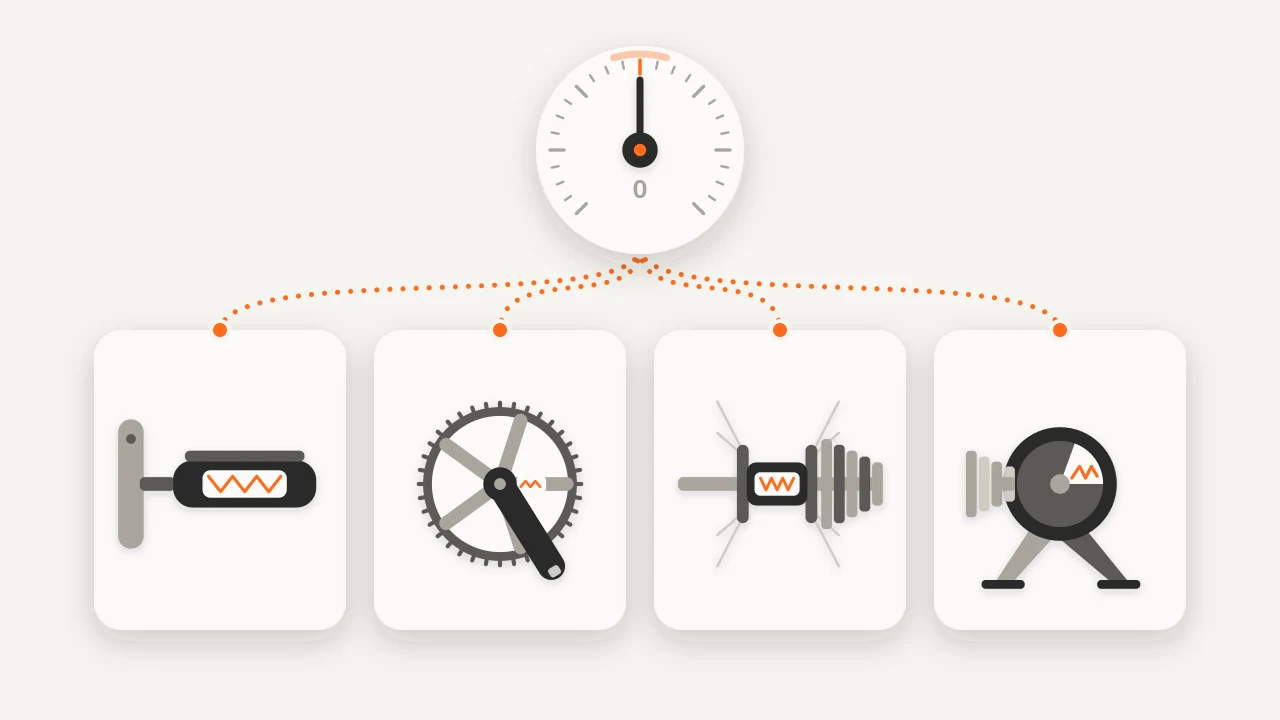
Key takeaways
- Manufacturers commonly claim ±1–2% for good pedal, crank and direct-drive trainer models, while wheel-on and budget trainers are often around ±3–5%; 2% of 250 W is 5 W.
- A single-sided meter doubles one leg, so if your left leg does 52% of the work a left-only meter reads 104 W when you truly produce 100 W.
- Pedals and cranks read before the chain and hubs and trainers after it, so a gap of a few percent between sources is typical.
- Zero offset before each ride, spin down a trainer after warming up, and if two sources disagree by 5% or more, recalibrate and check batteries, firmware and torque.
Power meter pedals vs crank, spider, hub and trainer: where each one measures
Every power meter uses strain gauges to sense how much metal flexes under load, converts that to torque and multiplies by cadence to get watts. What differs is where on the drivetrain it sits.
| Type | Where it measures | Strengths | Trade-offs |
|---|---|---|---|
| Pedals | In the pedal body or spindle, one or both sides | Swap between bikes in minutes; true left/right data (dual) | Fixed pedal system and cleats; costly; handle with care |
| Crank arm | Inside the left (or both) crank arms | Cheapest way to add power; light | Single-sided unless both arms; fits specific cranks |
| Spider or chainring | In the spider behind the chainrings, total of both legs | Whole-leg total; rugged; no extra parts | Bike-specific; needs a compatible crank and bottom bracket |
| Rear hub | In the rear hub, after the chain | Includes drivetrain losses; robust | Tied to one wheel; fewer models today |
| Smart trainer | In the flywheel or resistance unit | Already in your setup; nothing to install | Indoor only; needs calibration |
Position matters because power is read before or after the chain. Pedals, cranks and spiders read before drivetrain losses; hubs and trainers read after, so the same effort shows a little less there.
Power meter accuracy: claims vs real life
Manufacturers commonly claim ±1–2% for good pedal, crank and direct-drive trainer models, with wheel-on and budget trainers often looser, around ±3–5%. In independent tests, mainstream meters usually agree within a few percent at steady power; errors grow in sprints, at very low power, with temperature swings or when a zero offset is missed. Models differ, so check recent independent reviews for the one you are considering.
A few percent is small in training terms: 2% of 250 W is 5 W. It matters when you compare numbers across devices or set FTP on one and ride on another. Smart trainer power accuracy also depends on calibration, warm-up, firmware and temperature; for ERG sessions see indoor cycling and ERG mode.
Dual vs single-sided power meters
| Single-sided | Dual-sided | |
|---|---|---|
| Measures | One leg, then doubles it | Both legs separately |
| Left/right balance | Not available | Yes |
| Extra error | Your leg imbalance | None from imbalance |
| Cost | Lower | Higher |
| Good for | Trends and pacing on a consistent setup | Absolute numbers, rehab, bike fit |
The maths is simple: if your left leg does 52% of the work, a left-only meter reads 104 W when you truly produce 100 W (4% high); at 48% it reads 96 W. Few riders are exactly 50/50, and balance shifts with fatigue, cadence, power and injury. A split such as 49/51 is normal, so chasing 50/50 is unnecessary. If you train and test on the same single-sided meter, your zones stay consistent even if the absolute number is a little off.
Why power differs between head unit, trainer and Zwift
- Measuring points. Pedals and cranks read before the chain, hubs and trainers after; a gap of a few percent is typical.
- Calibration and temperature. Strain gauges drift with temperature, so a meter that was not zeroed can read several percent off.
- Smoothing. Head units and apps show instant, 3-second or 10-second averages, and settings differ.
- Two sources. If a trainer and pedals are both paired, check which one the app uses as its power source.
Zwift's watts come from your trainer or meter; its speed and W/kg depend on the weight in your profile (Zwift guide). Pick one reference source for FTP and zones, and treat a 2–3% gap between devices as normal. At 5% or more, recalibrate and recheck.
Calibration: zero offset and spin-down
A zero offset resets the baseline of pedals, cranks, spiders and hubs: with the bike upright, cranks unloaded and the meter at riding temperature, start it from your head unit. Do it before each ride, or at least weekly, and after big temperature changes. Trainers use a spin-down: warm up for about 10 minutes, follow the app's steps, and repeat after moving the trainer. Keep firmware updated, replace weak batteries and tighten pedals and crank parts to the maker's torque.
What to buy: choosing the best power meter for you
| If you... | Consider |
|---|---|
| Ride several bikes | Pedals |
| Have one bike and a tight budget | A single-sided crank arm |
| Want whole-leg totals fixed to one bike | A spider or dual crank-based meter |
| Mostly ride indoors | The smart trainer's own meter; add pedals only if you ride outdoors too |
| Want left/right data for rehab or bike fit | Dual-sided |
Check compatibility first: crank and bottom bracket standard, pedal and cleat system, ANT+ and Bluetooth for your head unit, and battery type. The brands in MoveVitals' device guides make relevant gear, from the Magene T600 trainer to Wahoo ELEMNT and KICKR, but compare specs and independent reviews rather than logos. You do not need a meter to benefit from structured training: heart rate and RPE also work (heart rate vs power).
In MoveVitals
Power from Zwift, Wahoo, Garmin and Magene (via Strava) arrives with heart rate and cadence streams and the recording device named, so a ride on a Magene T600 stays labelled as such. When two devices recorded the same ride, MoveVitals merges the recordings; see how conflicts are resolved. Your own FTP tests, zones and comparisons stay consistent if you keep one power source as the reference.
Worked example
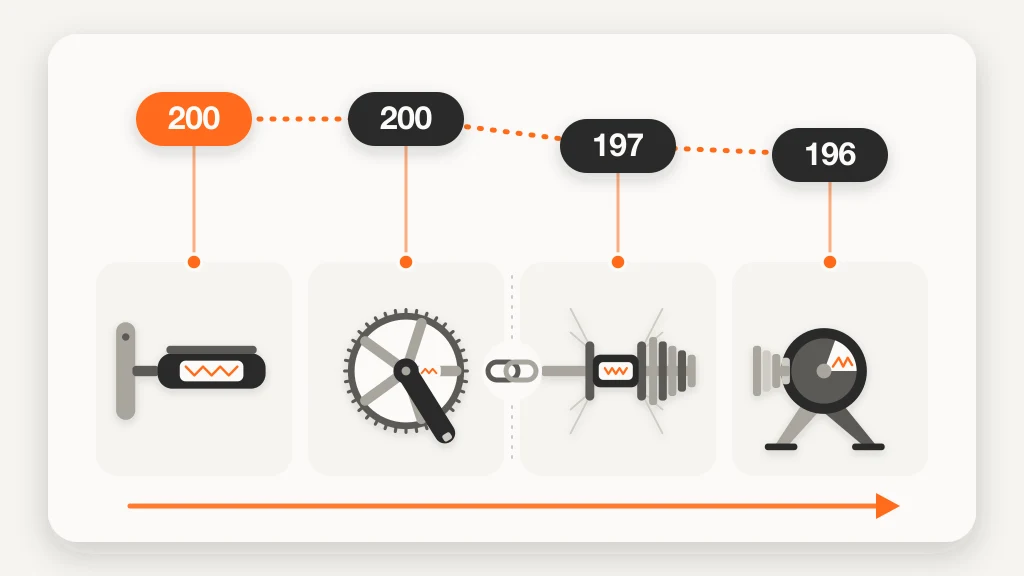
Illustrative scenario. Chris, 41, rides dual-sided pedals outdoors and a direct-drive trainer indoors. In a steady 30-minute indoor session with both recording, the pedals average 200 W and the trainer 196 W: a 2% gap, in line with drivetrain loss and the ±1–2% claims. On a cold garage morning the trainer reads 188 W (6% below), so he does a spin-down after warming up and zeroes the pedals; the gap falls back to 3 W (1.5%). His old left-only crank meter once read 212 W against the pedals' 200 W (6% high), which means his left leg produces about 53% of his power. He treats the pedals as the reference, sets FTP and zones from them and expects the trainer within 2–3%. Figures are illustrative.
Action steps
- Decide where you ride (indoors, outdoors, how many bikes), pick a type from the table and check compatibility before buying.
- Zero offset before each ride; spin down your trainer after warming up and after moving it.
- Choose one reference source for FTP, zones and comparisons, and retest if you switch.
- If two sources disagree by 5% or more, recalibrate, check batteries, firmware and torque, then compare again.
- Record your rides and sync them so you can compare devices and trends over time.
Related guides
- FTP (functional threshold power): what it is and how to test it
- Cycling power zones explained: the 7 zones from FTP and how to train in them
- Heart rate vs power vs pace: which should you train with?
- Indoor cycling and ERG mode: getting the most from a smart trainer
- Magene T600 and other Magene devices with MoveVitals
FAQ
Pedals or crank arm power meter? Pedals if you want to move between bikes or want true left/right data; a crank arm if you want the lowest cost on one bike. Both are accurate enough for training when calibrated.
Is a single-sided power meter good enough? For most training, yes: it is consistent as long as you train and test on it. It assumes a 50/50 split, so absolute numbers can be a few percent off.
How accurate is smart trainer power? Direct-drive trainers commonly claim ±1–2%, wheel-on and budget models often more. Calibrate, warm up and expect a few percent difference from pedals.
Why does my Zwift power differ from my bike computer? Different measuring points, calibration, temperature and smoothing, and which device is set as the power source. A 2–3% gap is normal.
How often should I calibrate? Zero offset before each ride, or weekly at least; spin down a trainer after warming up and after moving it.
References
- Allen and Coggan (2010). Training and Racing with a Power Meter (2nd ed.). VeloPress.
- Jobson et al. (2009). The Analysis and Utilization of Cycling Training Data. Sports Medicine. https://doi.org/10.2165/11317840-000000000-00000
For general information only. This is not medical advice — talk to a qualified professional about your health.
Keep reading
Training science
Sweet spot and threshold training: raising your FTP
3 min read
Training science
Zone 2 training: the science and how to do it right
4 min read
Devices & setup
Strava and MoveVitals: workouts, streams and devices that arrive via Strava
3 min read
Mobility & stretching
Mobility vs flexibility: what's the difference and what do you need?
3 min read
Training science
Polarized training (80/20): easy most of the time, hard some of the time
4 min read
Mobility & stretching
Hip mobility for runners and cyclists: a 10-minute routine
3 min read